How to use
Creating blocks
There are 4 ways:
- Right-click on the canvas and select the desired one
- Drag the actor from the tab on the left to create a lines block
- Drag sprite from the tab on the left to create a sprite block
- Drag sound from the left tab to create a sound block
Move a block
You can move a block on the canvas by holding any part of it, including the lettering on top.
Deleting a block
To delete a block, click on any part of it, triggering a selection and, consequently, a preview. Then press the Delete or Backspace key.
Hotkeys
- Ctrl+D on selected blocks - creates its full duplicate.
Ctrl+C, Ctrl+V, Ctrl+Z and other hotkeys are temporarily unavailable on the current version. But they will be added in future versions. Check our Blog for updates.
Connecting blocks
To connect blocks - draw a line from the right part of one block (output) to any part of another block. Or to the left (input) part of another block.
Each output point can have only one connection to another block. At the same time, input connections have no restriction.
Disconnecting blocks
Click on the output point of a connected block. You can also click on the input point of the block, but note that this action removes all input connections.
Connection types
Connections are divided into 2 types:
- Solid
- Dashed
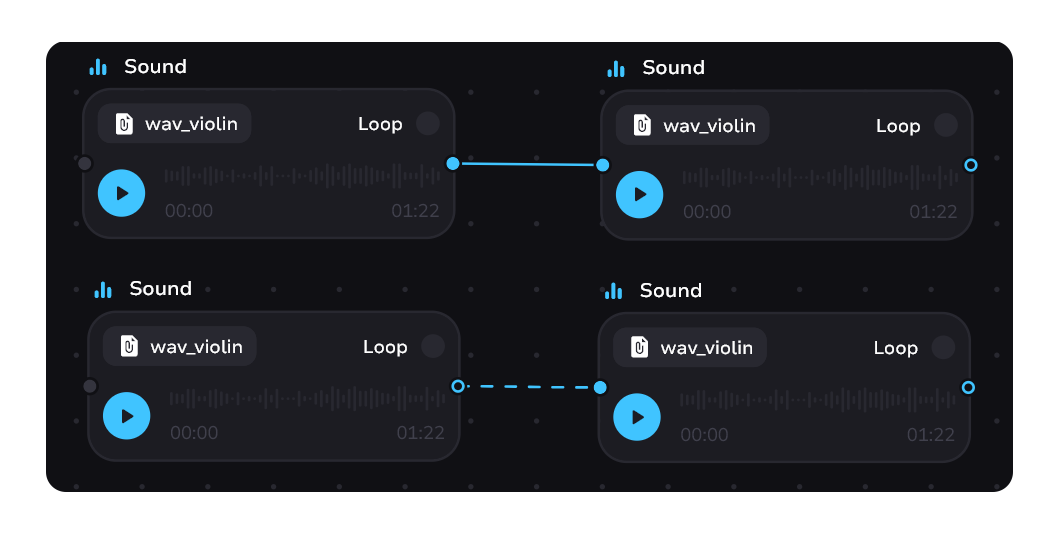
Solid
It means that the player will need to click or tap to move between tale blocks.
Dashed
The transition between blocks is done without a click or delay. While dragging a solid connection from one block to another press shift to switch type.
Some blocks support only one type of connection per output and no type switching will occur. For example, line block. Blocks with an output dashed connection also cannot switch type to another.
The dashed line can also be red, but only in condition blocks. This is how a branch of the tale is displayed where the condition is not met.
If you need a delay between blocks connected by a dashed line - see the article about wait block.